
Clay review 2026: real pricing, hidden credit costs and who it's for

Clay is probably the best enrichment engine you can buy, and it's also the one whose invoice nobody manages to predict. This review gives you the real plan names, the real credit allocations, the cost per credit at each tier, and the line items that turn up after you've already committed.
How did we check Clay?
Every plan name, price and credit allocation below comes from Clay's public pricing page, read on August 10, 2026 with both the monthly and the annual toggle open. We did that because the previous version of this page still described a credit model Clay retired in March 2026, and because most of the comparison pages ranking for Clay pricing today haven't caught up either: they still quote Starter, Explorer and Pro.
We haven't run a controlled match-rate test across providers on one identical list, so there's no scorecard here, and an invented percentage would be worth less than this sentence admitting it. We pay for the plans we write about, no vendor read a word of this before publication, and Gojiberry is our own product. Clients like Wispra run their pipeline on it, which is the bias to read the last third with.
Clay in one table
Seven dimensions, each scored out of five, each defended further down this page.
Table of contents
- Clay in one table
- What is Clay?
- Who is Clay built for?
- What Clay does best
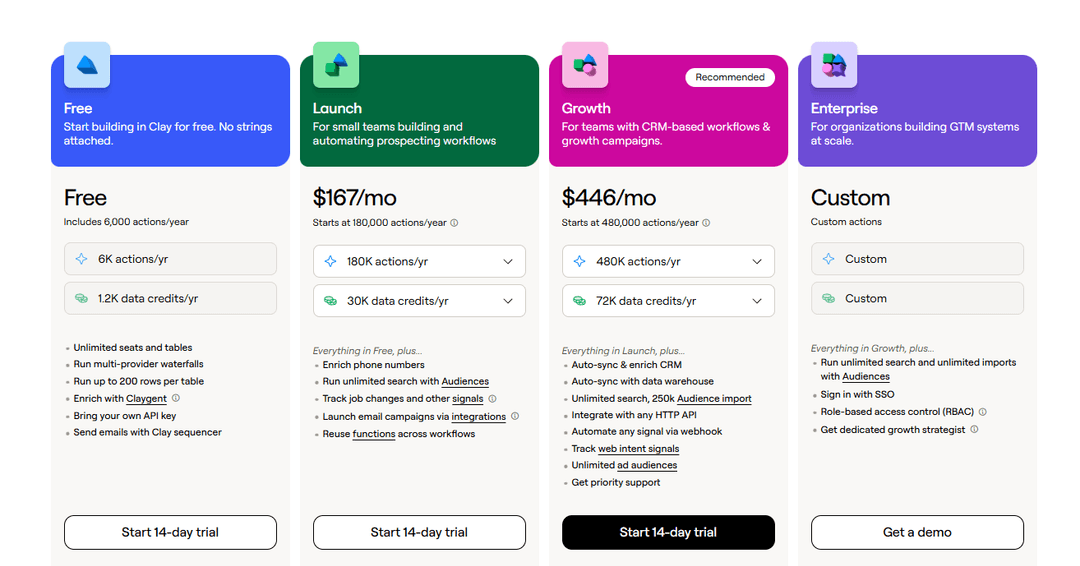
- How much does Clay cost?
- What Clay users complain about
- Enrichment is a different problem from timing
- How does Clay compare?
- Is Clay worth it in 2026?
- Common questions about Clay
What is Clay?
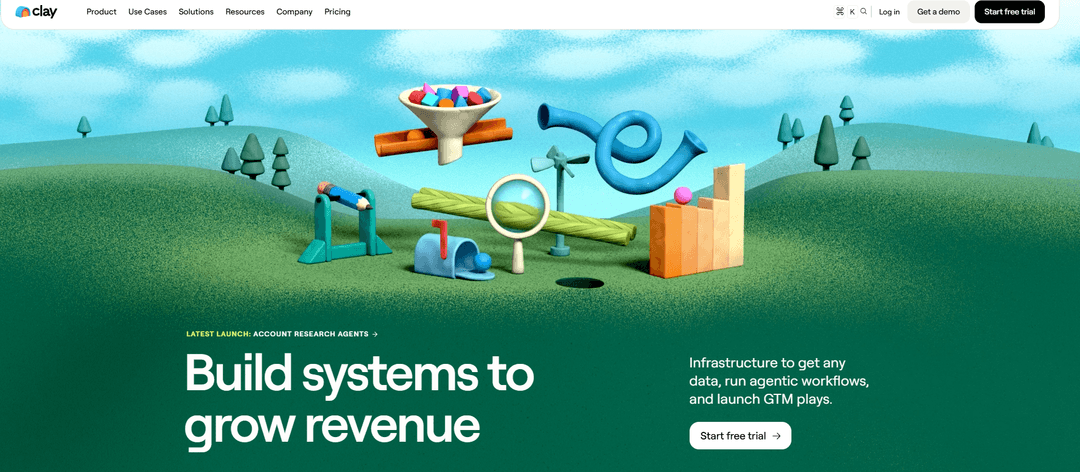
Clay was founded in New York in 2017 by Kareem Amin, and Varun Anand joined as co-founder in 2021. The company set out to make programming reachable for people who don't code, then found its market in go-to-market data.
The money followed quickly. CapitalG led a $100 million Series C in August 2025 at a $3.1 billion valuation, and a second employee tender offer in January 2026 priced the company at $5 billion. Clay says it passed $100 million in annual recurring revenue at the end of 2025 and that it's serving more than 14,000 customers, with OpenAI, Anthropic, Rippling and Intercom among the named ones.
Clay is an orchestration layer for data. You bring rows in from a CSV, a search or a CRM export, then add columns that call a data provider, an AI prompt or an integration, and you're watching the table fill itself in place.
It's easier to say what it isn't. It isn't a CRM. It doesn't own a contact database: every record it returns is bought from one of the 150+ partners in its marketplace. And the email sequencer it ships closes the loop rather than replacing a dedicated sending tool.
Who is Clay built for?
Two lists. Recognize yourself on the left and Clay will pay for itself. Recognize yourself on the right and you'll spend three months learning a tool built for a problem you don't have.
- 🔧Someone on the team enjoys building systems and has hours a week for it.
- 🔍Your list problem is coverage: you know who to contact and half the fields are empty.
- 🏢You run outbound for several clients and want one place to hold the logic.
- 🎯The profile you sell to is narrow enough that no packaged database covers it.
- 🔗You already pay for a sequencer and a CRM, and the missing piece is data quality.
- 📦You enrich at least a few thousand records a month.
- 👥Everyone carries a quota and nobody owns tooling.
- 📤You want to log in and send, with the targeting decided for you.
- 📌Your monthly volume sits under a few hundred contacts.
- 📊Budget certainty matters more than ceiling, because two meters make forecasting hard.
- 🔄You need CRM sync and can't justify $495 a month to get it.
- 🔔Your bottleneck is timing, not completeness.
3 questions
Is Clay the right shape for your team?
No email required.
QUESTION 1 / 3
What breaks first in your outbound today?
QUESTION 2 / 3
Who would own Clay inside your team?
QUESTION 3 / 3
How many people do you want to reach in a month?
🎯
Your match
Gojiberry is the closer fit
Your answers point at a targeting problem rather than a data problem. Building tables won't fix a week where the right twenty people never surfaced, and that's the part we automate.
- Buying signals watched across socials and the web
- Leads filtered against the profile you sell to before anything goes out
- First message written for you, on the channel that fits
- One monthly price, with no credit meter to watch
🧰
Your match
Clay earns its price here
You've got coverage gaps and somebody to own the build, which is where Clay is worth every credit. Come back when the tables are full and the replies are still flat, because choosing who to write to this week is the piece we add on top.
- Waterfalls across 150+ providers on a single field
- Claygent for answers no database indexes
- Scoring, routing and scheduled reruns
- Budget for $495 a month once CRM sync matters
What Clay does best
Five things carry the product. They're worth separating, because the first two are where the price is justified and the last three are where the learning curve lives.
What does waterfall enrichment change on your fill rate?
A waterfall is an ordered list of providers on one field. Ask for a work email and Clay queries the first provider, keeps the result when it comes back verified, and moves to the second only when the first can't resolve it. Put your cheapest reliable source first and your expensive specialist last, and you pay specialist rates only on the rows nobody else could resolve.
This is why people pay for Clay instead of buying one database. No single vendor covers every market evenly, and the gap widens fastest on niche European segments. If you're only after one work email at a time, our free email finder answers that without any of this.
How much does Clay cost?
Three things matter here: what each tier holds, what a credit costs at each level, and what turns up on the invoice that isn't on the pricing page.
Two meters run at once, which changes how the sticker price reads. Data credits pay the provider for the email address or the mobile number. Actions pay Clay for the platform work around it: running the table, calling the provider, pushing the row into your CRM. One enrichment on one row can hit both, and they don't refill on the same terms.
What does a Clay credit cost at each tier?
Both paid plans are sliders, so the headline number is a default position rather than a floor. The advertised $185 on Launch splits into roughly $60 of platform actions and roughly $125 of data credits. Push the credit slider up and you're paying less per credit.
A credit costs five cents at the bottom of the slider and about four and a quarter cents at the top. That is a fifteen percent spread across a twentyfold jump in volume, which makes Clay cheap per lookup at scale and unremarkable per lookup at the volume three reps generate. Annual billing takes roughly another ten percent off and hands you the whole year of credits up front.
Which Clay costs show up after you sign?
- 💰Top-ups carry a 30% premium. Run dry mid-month on Launch and the extra credits cost about six and a half cents each instead of five.
- 🔁Actions never roll over. Data credits bank up to one extra month, or 15% of the yearly allocation on annual plans. Unused platform capacity resets and disappears.
- 🧪Learning is billed at production rates. Lookups that return nothing stopped costing credits in March 2026, a real improvement, and a waterfall pointed at the wrong 800 rows still returns data on all of them and charges for every one.
- 🧮Variable AI pricing arrived in the same update. The heavier models bill on tokens consumed, estimated before the run and settled after it.
- 🔒Single sign-on is an add-on on Growth. It ships included only at Enterprise, where the commitment runs annually and the price is quoted.
Which plan do you need for CRM sync?
Growth, at $495 a month. That is a $310 step up from Launch for the ability to write enriched records back into HubSpot or Salesforce without a middleman. The same step buys HTTP API integrations, webhook automation and web intent signals.
It is a fair trade at volume and a strange one at the bottom of the market, since syncing a CRM is the first thing most teams want from an enrichment tool rather than an advanced use of one. Clay did move these features down from the retired $800 Pro plan in March 2026, and $3,720 a year remains the entry ticket for any small outfit that wants its data to land where the work happens.
Run the math for a team of three.
Three reps, 400 prospects a month each, so 1,200 contacts. A four-column waterfall covering work email, verification, mobile and company data is four marketplace lookups on every row that resolves, so you're at roughly 4,800 credits in a month.
Launch gives you 2,500. Growth gives you 6,000 and costs $5,940 a year before anyone sends a single message, and you still need a sequencer on top. Deciding which of those 1,200 people deserve a message this week is the expensive part, and it is the part Clay leaves on your desk.
If that arithmetic already reads like a no, the shortlist we've built of Clay alternatives is where you'd start looking.
What Clay users complain about
Clay's ratings are unusually split, and the split is informative. On G2 it holds 4.7 out of 5 across roughly 189 reviews at the time of writing, with reviewers tagging integrations, ease of use and time saved. The negative tags on the same page don't wander far: learning difficulty, expense, credit limits.
Its Trustpilot page tells a different story on a far smaller sample, sitting in poor territory. Read the two together and the pattern is clear. People who invest weeks in the tool rate it near the top of the category, people who signed up expecting a prospecting app rate it near the bottom, and they're describing the same product.
Three complaints recur across review sites and community threads. The first is time to competence: the spreadsheet interface reads as familiar and the multi-step logic underneath doesn't. The second is budget predictability, which the dual meter improved without solving. The third is scope, since Clay is one brick in a stack and the invoice for the rest of the stack arrives separately.
Enrichment is a different problem from timing
Clay answers one question completely: how do I get accurate, complete data on a list. It doesn't answer the second one. Who on this list deserves a message this week? A perfectly enriched cold list is still a cold list.
The two problems also decay at different speeds. B2B contact data goes stale at around 2.1% a month, roughly 22.5% a year, according to HubSpot's database decay research. That's a maintenance problem, and enrichment is the right answer to it. Buying intent moves in days instead of months, and no amount of enrichment tells you that somebody changed jobs on Tuesday.
Job changes alone are a larger signal pool than most teams assume. Median tenure in a US job sits at 3.9 years, and the Bureau of Labor Statistics reports that 22% of wage and salary workers haven't been with their employer a full year. In a target list of 1,200 people, a fifth are new enough in post to still be choosing their tools.
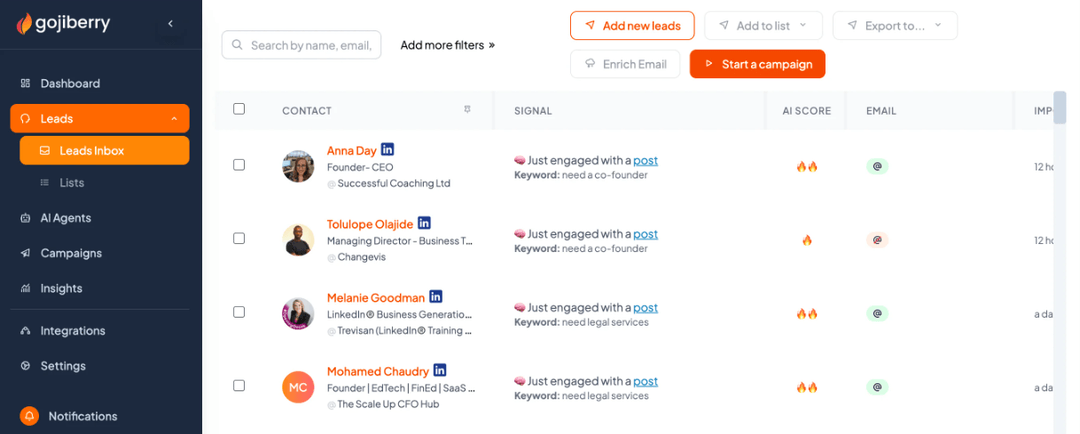
That gap is where we built Gojiberry. It watches more than 30 buying signals across socials and the web, filters what it finds against your ideal customer profile, and opens a personalized conversation with the accounts that match. There's no table to build and no credit meter to watch, and the trade is that we hand you a thinner record than a fully built Clay table produces.
Why we ended up building this
Roman, one of our cofounders, spent his days prospecting on socials for Coco.ai, a Shopify app he grew to around $500K in revenue before it sold. The part that ate the week wasn't writing messages. It was finding people worth writing to, which he did by hand, watching who engaged with what and keeping the results in a spreadsheet.
He was running an intent search by hand, badly, and it still beat buying a bigger database. Coco is where we learned that the list isn't usually the bottleneck. Gojiberry started as the automation of a habit that already worked.
Wispra
60%
of weekly demos sourced from intent signals
Mindflow
+31%
reply rate on intent-based outbound
GTE Localize
100+
meetings after dropping cold email
Wispra sells data structuring for AI search, a category that barely existed eighteen months ago, so no database could hand them a list of buyers. They stopped asking who fits the profile and started asking who is already discussing the category, tracking engagement with AI search content and conversations around competitors.
Roughly 30 demos a week now run through that motion, about 60% of them sourced by Gojiberry, and it influences close to half of their revenue. Decathlon, Allianz and AXA came in that way rather than through volume.
Gojiberry finds your prospects for you
Clay makes a list complete. Gojiberry decides which twenty people on it are worth writing to this week, and writes the first message.
Get your first leads for freeHow does Clay compare?
Five tools, four questions. This is a positioning table rather than a feature checklist, because you're choosing a category before you choose a product inside it.
What we don't do belongs in the same table. Gojiberry is no kind of enrichment engine. If your fill rate sits at 40% on a list you already trust, Clay fixes that and we do not. We find and contact people who are already in motion, and the record we hand over is thinner than what a seven-column Clay table produces.
For the record on our side: Gojiberry runs at $99 a month on its Pro plan, with two AI agents and up to 1,800 prospects contacted, then a custom plan from five seats up.
We've reviewed two of the four at length: our Apollo review and our ZoomInfo review. If you're at the replacement stage instead of the category stage, we keep separate lists of Apollo alternatives and ZoomInfo alternatives. The earlier version of this page put Clay against PhantomBuster, and that audience has its own page of PhantomBuster alternatives.
Is Clay worth it in 2026?
Yes for a certain team, and the certainty cuts both ways.
- 🧠Someone owns operations and can spend hours a week inside tables.
- 📈You enrich several thousand records a month, where the per-credit price starts working for you.
- 🔎The profile you sell to is narrow enough that no packaged database covers it.
- 🧩You want one place to hold logic that currently lives in four tools.
- 🔖You can absorb $495 a month before counting credits, because CRM sync is where you'll land.
- 🤝You run outbound for clients and can bill the build time.
- 📝Every person on the team carries a quota and nobody owns tooling.
- 📬You contact under a few hundred people a month.
- 🧮You need the invoice to be the same number every month.
- 🔒CRM sync matters more to you than fill rate, and Growth turns that into a $3,720 decision.
- 🧰You expected a prospecting tool and would be buying a build environment.
- 💬Your data is already fine and your replies are still flat.
For a sales team of two to ten with nobody on operations, our read is that Clay is over-engineered for the job in front of it. That says something about fit and nothing against the engineering, which leads its category. If you've landed on the skip side and still need better lists, the cheaper Clay alternatives we tested cover that ground.
Common questions about Clay
How much does Clay cost per month?
Free is $0. Launch starts at $185 a month, or $167 billed annually, with 2,500 data credits and 15,000 actions. Growth starts at $495, or $446 annually, with 6,000 data credits and 40,000 actions. Enterprise is quoted and requires an annual commitment. Both paid plans are sliders, so those figures are default positions and they'll move with the volume you set. We checked every number here on Clay's pricing page on August 10, 2026.
Is Clay free?
There's a permanent free plan with 100 data credits and 500 actions a month, capped at 200 rows per table and without phone enrichment. Clay also runs a 14-day trial on the paid plans. The free tier is enough to understand the interface and not enough to run anything in production, which is fair for a tool this deep.
How do Clay credits work?
Since March 2026 there are two meters. Data credits buy records from the 150+ providers in Clay's marketplace and start at five cents each. Actions pay for the platform work around those lookups and cost under a cent each. A single enrichment can consume both. Data credits roll over up to one extra month's worth. Actions don't roll over at all.
Why do Clay credits disappear so fast?
Because a table charges per column, per row. A four-step waterfall on a thousand contacts is four thousand lookups, and every AI column sitting on top of it bills separately. Clay stopped charging for lookups that return nothing, which helps, though a run aimed at the wrong segment still returns data on every row and charges for all of it. The quickest way to burn a month is to test on the full list when fifty rows would've told you the same thing.
Do you need a technical person to use Clay?
Not technical in the sense of writing code, and yes in the sense of enjoying systems. Formulas, conditional branching, run schedules and provider ordering are all learnable in a few weeks by somebody who wants to learn them. Learning difficulty is the most cited criticism on Clay's own review pages, and the teams that struggle are the ones where the work landed on a rep who didn't.
Is Clay worth it for a team of three?
Rarely, on our read. Three reps working 400 prospects a month each will land on Growth at $495 for credit headroom and CRM sync, which is $5,940 a year before a sequencer, and the tool still won't decide who to write to. Teams that size usually get more from spending the budget on knowing who to contact. Mindflow lifted its outbound reply rate by 31% after switching to intent-based targeting, and you can read how Mindflow ran it.
Clay or Apollo, which one?
Different categories. Apollo owns a database and ships a sequencer, so one subscription covers finding and sending, and the ceiling on data quality is whatever Apollo's own data supports. Clay owns no data and chains other people's, so the ceiling sits higher and the setup runs longer. Pick Apollo to start sending this week. Pick Clay to build a data layer you'll still be using in two years.
Can you use Clay and Gojiberry together?
Yes, and it's a sensible pairing when you carry both problems at once. Gojiberry surfaces who moved and opens the conversation, then Clay fills in whatever your CRM needs on the accounts that reply. The overlap stays small because we work forward from a signal and Clay works forward from a list.
Want us to find the prospects too?
Tell Gojiberry who you sell to and it starts finding prospects who are already looking. No tables to build, no credits to watch.
Get a free agent runningSee the case studies
More High-Intent Leads = Your New Growth Engine.
Start Now and Get New High Intent Leads Delivered Straight to Slack or Your Inbox.