
Marketing Automation on LinkedIn: The Ultimate B2B Playbook

So, you're probably already using some form of marketing automation, right? Most likely for email. But here's a question: is LinkedIn part of that automated strategy? If not, you're leaving a massive B2B growth channel on the table. 😬
Look, marketing automation on LinkedIn isn't about spamming prospects with generic messages. It's about using smart software to handle the repetitive stuff—sending connection requests, personalized messages, and follow-ups—so you can scale your outreach without losing that crucial human touch.
Ready to see how the pros are doing it? Let's dive into a complete comparison of the best solutions out there.
What is LinkedIn Marketing Automation, Really?
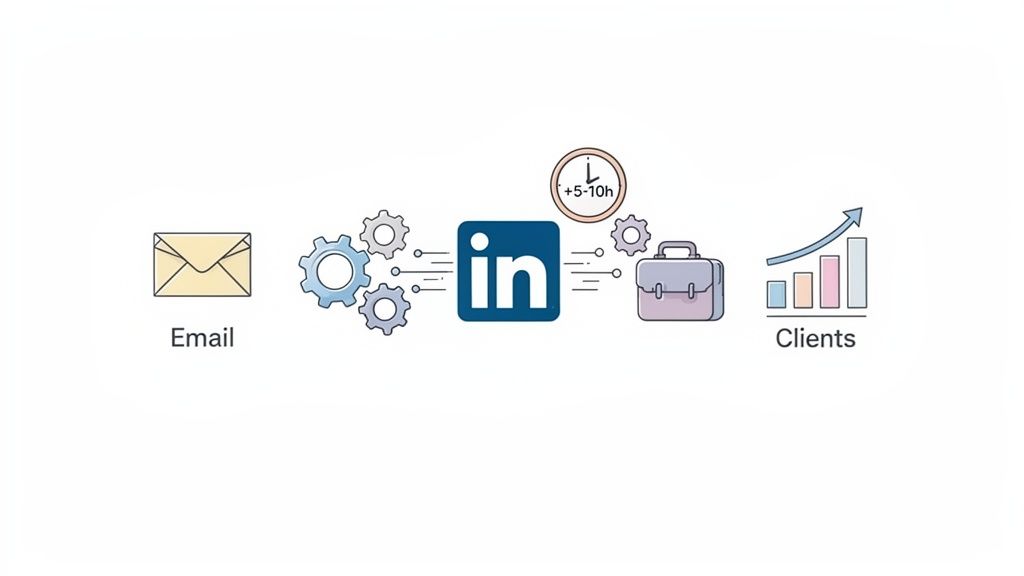
Let’s get straight to the point. LinkedIn Marketing Automation means using specialized tools to automate your marketing and sales actions on the platform. Think of it as your personal assistant, tirelessly working in the background to build your network and fill your pipeline while you focus on closing deals.
Common Use Cases That Just Work
So, what does this look like in the real world? Here are a few winning plays that B2B teams are running right now:
- Lead Nurturing (Multi-Channel Power): A new lead enters your funnel. They get a welcome email, and two days later, a personalized connection request on LinkedIn. This multi-touch approach builds trust way faster than email alone.
- B2B Prospecting on Autopilot: Automatically find and engage key decision-makers who fit your ideal customer profile. For a deep dive on this, check out this guide on how to find high-quality leads on LinkedIn.
- Recruitment That Scales: Automate initial outreach to promising candidates, send timely follow-ups, and keep your talent pool warm. No more manual chasing!
- Community Management: Schedule posts, auto-engage with comments, and keep your company page buzzing with activity, boosting your organic reach.
The Tangible Benefits (aka The Good Stuff ✨)
A solid automation strategy isn't just a time-saver; it’s a revenue-driver. The data is clear: teams that blend LinkedIn into their automated workflows see massive wins.
Users often report saving 5-10 hours per week, which is huge. But the real kicker? This efficiency boost frequently leads to doubling the number of qualified leads generated. We're talking a potential 50% increase in leads and a 30% lift in conversions.
Here’s the bottom line:
- Massive Time Savings: Ditch the repetitive tasks and focus on high-value conversations.
- Superior Results: Multi-channel outreach flat-out performs better.
- Personalization at Scale: Send hundreds of relevant, personalized messages that feel one-to-one.
- Impressive ROI: It's common for companies to see a 3-5x return on investment.
Ready to see what you've been missing? Let’s figure out how to pick the right tool for the job.
Your Checklist For Choosing the Right Automation Tool
Alright, so you’re ready to jump into LinkedIn automation. Great move! But the market is flooded with options, and picking the right one can feel... overwhelming. Don't sweat it. Let's walk through a practical checklist to help you cut through the noise.
1. Deep LinkedIn Integration
First things first: the tool has to play nice with LinkedIn. And not just a surface-level connection. We're talking deep, functional integration.
Ask these questions:
- Can it send personalized connection requests and messages that don't sound robotic?
- Does it track key interactions like replies or profile views?
- Can it pull data from LinkedIn profiles to enrich your lead records?
2. Solid Email Marketing Capabilities
Here’s a pro tip: don’t get tunnel vision on LinkedIn. The best B2B marketing automation strategies are multi-channel. Your tool needs to be just as good at email so you can build sequences that engage prospects on both platforms. This is how you stay top-of-mind.
3. An Integrated CRM
Generating leads is only half the battle. What happens after a prospect replies? If your answer is "copy-paste into a spreadsheet," we need to talk. Leads will fall through the cracks.
This is why a built-in CRM LinkedIn integration isn't a luxury; it's a necessity. Look for a platform that lets you track leads, score them based on engagement, and manage them in a clear sales pipeline.
4. Security & Platform Compliance (This is Critical!)
Okay, let's talk about the big one. This is an absolute deal-breaker. Choosing a tool that plays fast and loose with LinkedIn's rules is like gambling with your entire lead flow. A restriction or ban can shut you down overnight.
Your security checklist:
- LinkedIn ToS Respect: Is the company transparent about its compliance?
- Anti-Ban Guarantees: Do they offer safeguards like randomized delays, daily limits, and a dedicated IP address?
- Technology: Is it a flimsy browser extension (easy to detect) or a more secure, cloud-based platform?
Seriously, don't cut corners here.
5. Ease of Use
A tool can have all the bells and whistles in the world, but if your team can't figure it out, it's worthless. Look for a clean, intuitive interface and responsive customer support. You shouldn’t need a developer to launch a campaign.
6. Price vs. ROI
Don't just shop by the monthly fee. Think in terms of ROI. A tool that costs $50/month but generates zero meetings is far more expensive than one that costs $150/month and books five. Calculate the expected return.
7. Key Integrations
Finally, does it connect with your core tech stack? Think Zapier, Make, Slack, or your existing CRM. A tool that fits seamlessly into your workflows is one you’ll actually use.
The Top 5 LinkedIn Marketing Automation Tools: A Head-to-Head Comparison
Alright, time for the main event. You know why you need to automate and what to look for. Now let’s see how the top tools stack up in the real world based on industry research and user feedback.
We'll start with a quick overview to get you oriented.
At-a-Glance Comparison
Tip: This table is scrollable on mobile. Paste directly into a Webflow Embed element.
Now, let's pull back the curtain on each one.
1. Gojiberry: The LinkedIn Specialist
Gojiberry has built its name by going all-in on LinkedIn automation software and, based on feedback, they've nailed it. The platform is engineered to make LinkedIn prospecting as effective and safe as possible.
- Strengths: Its laser focus on LinkedIn is its superpower. Users report being able to get far more granular with personalization here than with generalist tools. The integrated CRM is a huge win, allowing teams to manage their entire pipeline in one place. Most importantly, the commitment to security (like offering a dedicated IP) provides peace of mind.
- Limitations: While it integrates with email platforms like Brevo or Mailchimp, its native email features aren't as robust as a tool like Lemlist.
- Verdict: 🏆 For any team where LinkedIn is the primary B2B lead gen channel, Gojiberry is consistently reported as the top choice. It offers the best mix of specialized features, security, and value.
2. Lemlist: The Email Marketing Powerhouse
Lemlist is a legend in the sales space, known for its incredible email outreach tools. They’ve since added solid LinkedIn features, making it a strong contender for multi-channel campaigns.
- Strengths: Nobody does email personalization better, especially with dynamic images and videos. The user interface is a joy to use, and it's backed by a massive community. Their email marketing automation is absolutely top-tier.
- Limitations: The built-in CRM is considered basic by many users, often requiring an integration with a more capable system. And while its LinkedIn functions are good, they don't have the depth of a dedicated tool.
- Verdict: If your strategy is email-first and you use LinkedIn to support those efforts, Lemlist is a fantastic choice. Perfect for teams that live and breathe cold email.
3. Dex: The CRM-Centric Solution
Dex comes at the problem from a different angle—it’s a CRM first, with good LinkedIn automation layered on top. This makes it ideal for teams who live inside their sales pipeline.
- Strengths: The CRM is the main event here. Users praise its advanced lead scoring, customizable pipelines, and detailed contact management. The LinkedIn integration is strong, feeding new leads directly into a highly organized sales process.
- Limitations: The email marketing features are fairly basic. For complex sequences, you’ll need another tool. It's also less specialized for LinkedIn, which might limit some creative outreach tactics.
- Verdict: If your biggest challenge is managing leads and you need a powerful CRM that also handles LinkedIn outreach well, Dex is a very solid option.
4. HubSpot: The Pricey All-in-One
HubSpot is the 800-pound gorilla of marketing automation. It’s a wildly powerful platform that does everything, but its LinkedIn automation can feel more like an add-on than a core strength.
- Strengths: The all-in-one ecosystem is incredibly convenient. The CRM and email tools are gold standards, and the support resources are staggering.
- Limitations: The price tag is the biggest hurdle; it's simply overkill for most startups. There's a steep learning curve, and the native LinkedIn automation is too basic for serious prospecting without third-party apps.
- Verdict: HubSpot makes sense for large companies with big budgets who need one system to rule them all. But for pure LinkedIn lead gen, it’s too expensive.
5. Pipedrive: The Sales-Focused Simplifier
Pipedrive is a CRM built by salespeople, for salespeople. It's known for its clean, visual pipeline. Its automation features, however, are an afterthought.
- Strengths: Simplicity is key. Users love its intuitive drag-and-drop interface. It’s affordable and does its core job—pipeline management—exceptionally well. For a deeper look at client acquisition, see the Ultimate Guide to LinkedIn Lead Generation for Service Businesses.
- Limitations: The LinkedIn automation is almost non-existent without relying on risky external extensions. Its email features are only good for basic follow-ups, not full campaigns.
- Verdict: Pipedrive is a great sales CRM for organizing existing deals. It is not a true marketing automation LinkedIn tool for proactive prospecting. To explore other options, check out these top free LinkedIn lead generation tools.
Case Study: Startup B2B - Gojiberry vs. Lemlist vs. HubSpot
Theory is great, but what about real-world ROI? Let's run a scenario.
The Setup: A 10-person B2B startup needs to generate 100 leads per month. Let's see how their choice of tool impacts their bottom line.
Scenario 1: Gojiberry (LinkedIn-First)
The team focuses on LinkedIn as their primary channel.
- Cost: €100/month
- Leads Generated: Their specialized approach nets them 150 leads/month (+50%).
- ROI: With a lead value of €100, the ROI is a stunning 1500%.
- Verdict: Best ROI by a long shot.
Scenario 2: Lemlist (Email + LinkedIn)
The team prioritizes a multi-channel approach.
- Cost: €150/month
- Leads Generated: The combo approach yields 140 leads/month (+40%).
- ROI: Still a very strong 933%.
- Verdict: Great results, but more expensive for slightly fewer leads.
Scenario 3: HubSpot (All-in-One)
The team has a bigger budget and wants a single platform.
- Cost: €500/month
- Leads Generated: The powerful suite brings in 160 leads/month (+60%).
- ROI: The high cost brings the ROI down to 320%.
- Verdict: While it generated the most leads, it was by far the least cost-effective. Too expensive for the ROI.
Conclusion: For a startup focused on LinkedIn lead generation, a specialized tool like Gojiberry delivers the best bang for your buck.
How to Choose the Right Tool for YOU
We’ve crunched the numbers, now how do you pick your tool with confidence? It boils down to one question: What is your #1 priority right now?
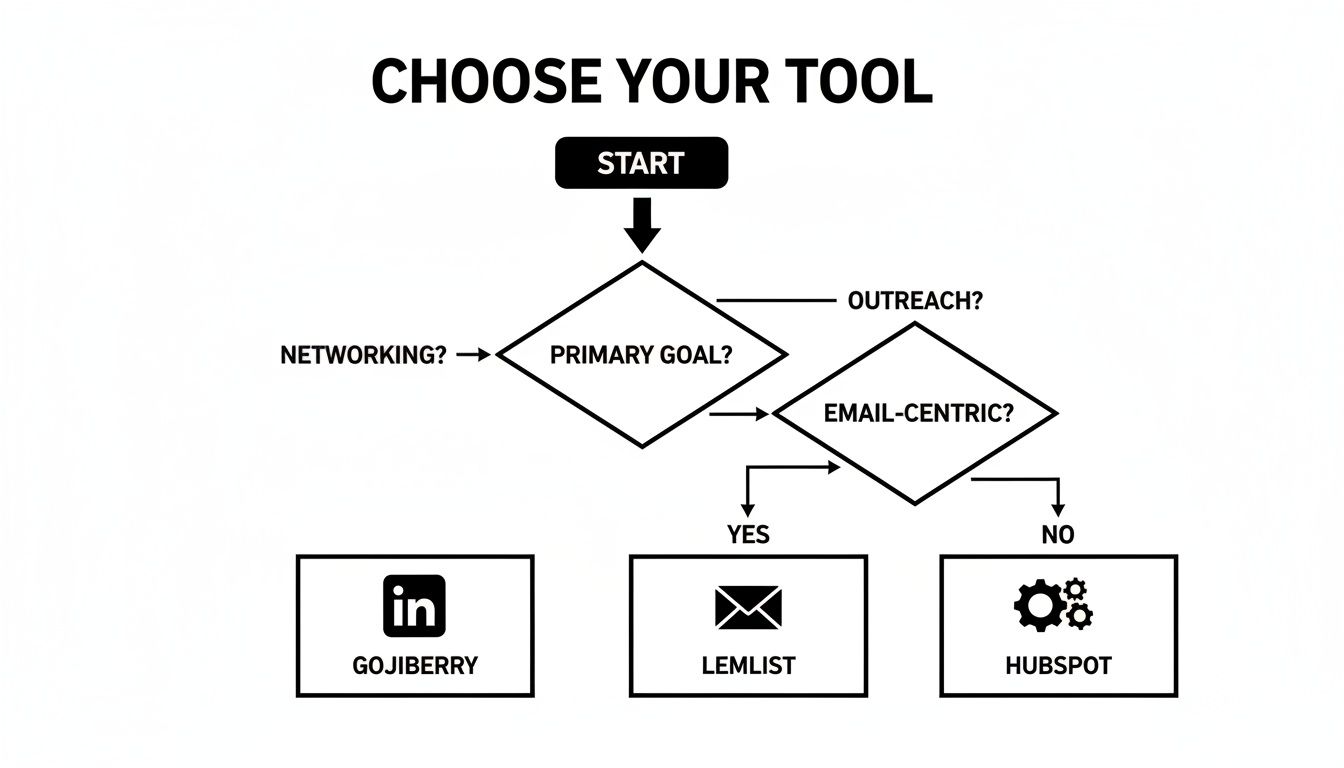
- ✅ Choose Gojiberry. It's built for this.
- ✅ Choose Lemlist. Its email automation is unmatched.
- ✅ Choose Dex. It’s a CRM powerhouse.
- ✅ Choose HubSpot.
- ✅ Choose Gojiberry or Pipedrive (if you just need a CRM).
Your Pre-Launch Checklist ✅
Before you commit, run through this final checklist. Five minutes now can save you days of headaches later.
- Define Your Priorities: What's the main goal? (LinkedIn, email, CRM?)
- Set Your Budget: Know your monthly limit.
- Test the Free Trials: Always test-drive the software. This is non-negotiable.
- Verify Integrations: Does it connect with your essential tools?
- Check the Security: Does it respect LinkedIn's ToS? Look for a dedicated IP.
- Read Recent Reviews: What are users saying on G2 and Capterra?
- Request a Demo: Ask the tough questions.
- Choose and Launch! 🚀
It's Time to Take Action
You’ve seen the data, weighed the options, and understand the massive upside of automating your LinkedIn outreach. Choosing the right tool isn’t just checking a box; it’s a strategic move that can genuinely double your lead flow.
Don't let another week of manual prospecting go by. The tools and roadmap are right here. All that's left is to start. By automating the repetitive, top-of-funnel tasks, you aren't sacrificing the human element—you're creating more time for it.
Ready to see what this looks like in practice? Your future pipeline is waiting.
Frequently Asked Questions (FAQ)
Got a few more questions? Let's tackle some of the most common ones.
Is LinkedIn automation safe in 2026?
Yes, but only if you use the right tool and a smart strategy. The key is to choose a cloud-based platform (not a browser extension) that provides a dedicated, country-specific IP address, like GojiberryAI. This makes your activity look completely natural. Also, stick to reasonable daily limits—mimic human behavior, don't act like a spam bot.
How many messages can I safely send per day?
There's no magic number, but here's a safe baseline to follow:
- Connection Requests: Keep it under 20-25 per day.
- Follow-up Messages (to existing connections): Around 40-50 per day is generally safe.
The golden rule? Quality over quantity. A hyper-targeted campaign to 20 perfect-fit prospects will always outperform a generic blast to 100 random people.
Can I use automation for my content strategy too?
Absolutely! This is a killer advanced tactic. You can set up campaigns that automatically message anyone who likes or comments on your posts. It’s a brilliant way to turn passive engagement into active conversations and pipeline-building opportunities.
Ready to stop manually connecting and start building your B2B pipeline on autopilot? The right platform is key. GojiberryAI was built from the ground up for safe, smart, and scalable outreach on LinkedIn.
👉 Try GojiberryAI for free and see how quickly you can generate high-intent leads!

More High-Intent Leads = Your New Growth Engine.
Start Now and Get New High Intent Leads Delivered Straight to Slack or Your Inbox.