
LinkedIn Sales Automation: How to Automate Outreach and Book More Meetings

Staring at your LinkedIn inbox, feeling like you're on a hamster wheel of manual prospecting? We’ve all been there. Sending connection requests, typing out follow-ups, and tracking replies one by one is a massive time sink that throttles your sales growth and keeps you stuck in first gear. 😩
Manual work doesn't scale. If you want to build a predictable pipeline, you need a process—not just more hours in the day. This is where LinkedIn sales automation comes in, not as a spammy robot, but as a strategic ally.
This guide will walk you through a framework for automating your outreach the right way. We’ll cover the importance of personalization, staying within safe limits, and measuring what actually moves the needle. Platforms like gojiberry.ai are designed to execute this kind of smart, scalable LinkedIn outreach for sales teams. The goal? Spend less time clicking and more time in conversations that close deals.
To beat the limits of manual work and seriously boost your team's output, it's worth exploring proven strategies to improve sales productivity. For a deeper dive into the basics, check out our guide on using LinkedIn for prospecting.
What Is LinkedIn Sales Automation?
Let’s get this straight. LinkedIn sales automation is the process of using software to handle repetitive sales tasks on LinkedIn. Think of it as your digital sales assistant, tirelessly working in the background.
What it includes:
- Sending personalized connection requests at scale.
- Deploying sequences of follow-up messages.
- Routing positive replies to your inbox for human takeover.
- Reporting on campaign performance (e.g., acceptance and reply rates).
What it is NOT:
- Spam: It’s not about blasting thousands of people with a generic pitch.
- Mass Pitching: Effective automation focuses on starting conversations, not closing deals in the first message.
- Unsafe Bots: Reputable tools are designed to mimic human behavior to keep your account safe, not use risky methods that get you banned.
Done right, automation brings consistency and efficiency to your prospecting, freeing you up for high-value activities like discovery calls and closing deals.
Why LinkedIn Is a Powerful Sales Channel
So, why all the focus on LinkedIn? Is it really worth the effort? Absolutely. Here’s why it’s a goldmine for B2B sales:
- Decision-Makers Live Here: With over 800 million members, LinkedIn is the #1 professional network. C-level execs, VPs, and managers are all active on the platform.
- Rich Contextual Data: You get access to invaluable data points: job titles, company size, industry, recent activity, and shared connections. This context makes personalized outreach a breeze.
- A Perfect Complement to Cold Email: LinkedIn isn't a replacement for email; it's a powerful partner. Users often report higher engagement on LinkedIn because it feels more personal and less saturated than an email inbox.
When you combine a targeted message with the professional context of LinkedIn, your outreach feels less like a cold call and more like a relevant introduction.
What You Can and Cannot Automate on LinkedIn
Automation is a powerful tool, but it’s not a magic wand. Knowing what to automate and what to keep human is the key to success. Ready to draw the line?
Many teams now use LinkedIn tools to automate your outbound sales workflows.
Tasks You Can Automate
These are the repetitive, top-of-funnel activities that eat up your time.
- Connection Requests: Sending personalized invites to a targeted list of prospects.
- Follow-Up Sequences: Nudging new connections with a series of 2-4 value-driven messages.
- Basic Qualification & Tagging: Automatically tagging leads based on their role or industry for better organization.
- Campaign Analytics: Tracking acceptance rates, reply rates, and other key performance indicators (KPIs).
Tasks That Should Stay Human
These are the high-touch moments where genuine interaction makes all the difference.
- Discovery Calls: You can’t automate building real rapport and understanding a prospect's pain points.
- Objection Handling: Navigating a "no" or "not right now" requires empathy and strategic thinking.
- High-Value 1:1 Messages: Crafting a truly bespoke message for a top-tier prospect should always be done by hand.
The rule of thumb? Automate the process, not the relationship.
Cloud-Based Tools vs Browser Extensions
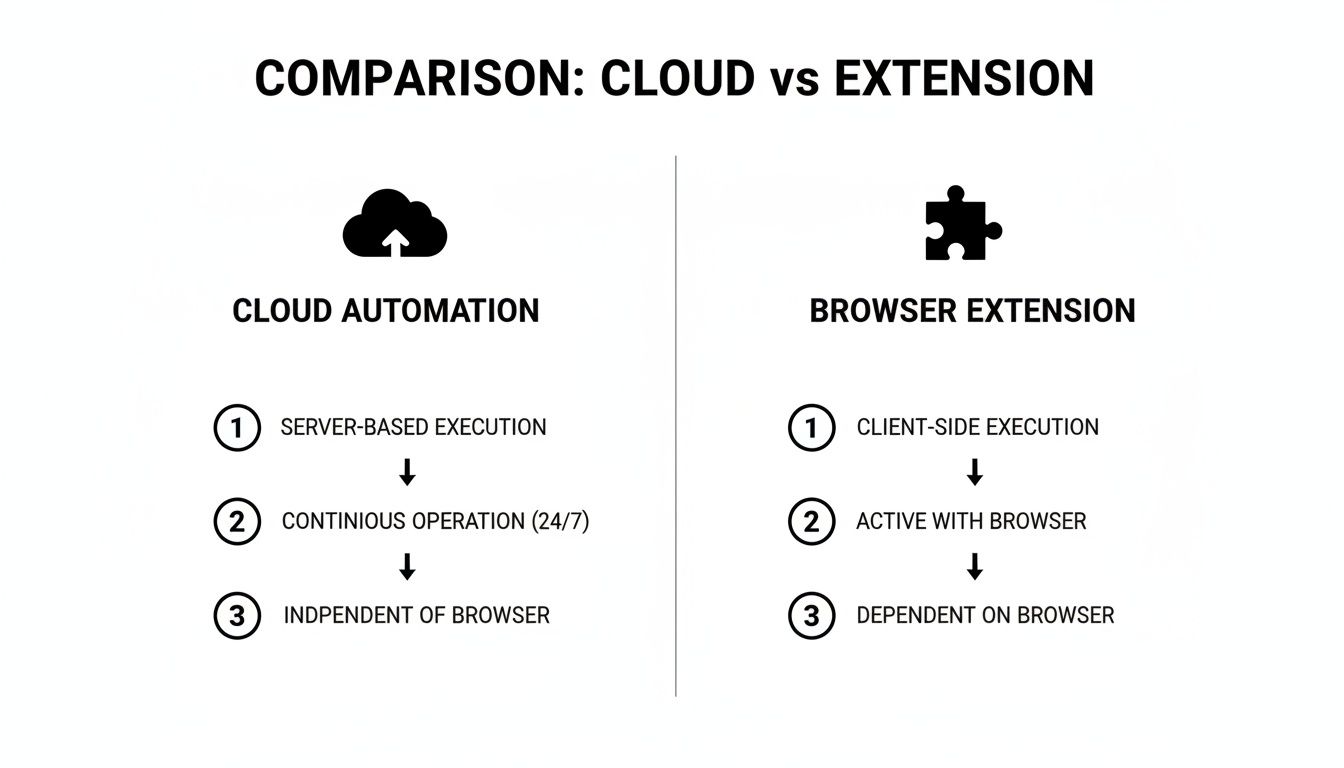
When you dive into the world of LinkedIn sales automation, you’ll find two main types of tools: cloud-based platforms and browser extensions. Understanding the difference is critical for your safety and scalability.
Cloud-based tools run 24/7 from a secure remote server with a dedicated IP address, mimicking human behavior even when your computer is off. This makes them safer and far more reliable for scaling outreach.
Browser extensions, on the other hand, run directly from your computer and use your personal IP. They only work when your browser is open, making their activity less consistent and potentially easier for LinkedIn to flag.
Here's a quick breakdown:
For serious sales efforts, the verdict is clear: cloud-based tools are safer, more reliable, and built to scale. While extensions can be a starting point, they don't offer the stability needed for a predictable sales pipeline.
The LinkedIn Sales Automation Framework (Step-by-Step)
Ready to build a repeatable system that turns LinkedIn into a lead generation machine? Let’s walk through the five essential steps. This isn't about flipping a switch; it's a strategic process.
Step 1 – Define Your ICP and Offer
Before you write a single message, you need absolute clarity on who you're targeting.
- Do: Create a detailed Ideal Customer Profile (ICP). Who are they? (e.g., "VPs of Sales at SaaS companies with 50-200 employees"). What are their biggest pain points?
- Don't: Target everyone. A vague audience gets vague results.
- Example: Instead of "marketers," target "Content Marketing Managers at B2B tech startups who recently hired 3+ people."
Your offer should directly address their specific pain point. What's the one thing you can help them achieve?
Step 2 – Build a High-Intent Lead List
Your campaign is only as good as your lead list. Garbage in, garbage out.
- Do: Use LinkedIn Sales Navigator filters to find prospects who match your ICP. Look for buying signals like recent job changes or company funding announcements.
- Don't: Scrape thousands of random profiles. Quality over quantity, always.
- Actionable Step: Create a saved search in Sales Navigator for your ICP and export it to your automation tool. Need a refresher? Here's how to find leads on LinkedIn.
Step 3 – Create Sales Sequences That Don’t Sound Automated
This is where most people fail. Your goal is to start a conversation, not pitch-slap.
- Do: Use personalization tokens like
{firstName}and{companyName}. Keep messages short (under 300 characters for connection requests) and end with an open-ended question. - Don't: Send a wall of text about your product features. Nobody cares (yet).
- Example Connection Request: "Hi
{firstName}, saw your recent post on AI in sales. Loved your take. Curious to learn more about your work at{companyName}. Open to connecting?"
Step 4 – Set Daily Limits, Cadence, and Stop Rules
Safety first! This step protects your account and prevents you from annoying prospects.
- Do: Start with conservative daily limits (e.g., 20-30 connection requests per day) and gradually increase. Set your campaign to automatically stop sending messages once a prospect replies.
- Don't: Go from zero to 100 requests overnight. This is a huge red flag for LinkedIn.
- Actionable Step: In your automation tool, set a daily limit of 25 connection requests and 40 profile views. Schedule messages to send only during business hours in your prospect's time zone.
Step 5 – Track Results and Optimize Weekly
You can't improve what you don't measure.
- Do: Monitor your key metrics weekly. Aim for a Connection Acceptance Rate > 25% and a Reply Rate > 15%.
- Don't: Let a failing campaign run for weeks without making changes.
- Actionable Step: If your acceptance rate is low, A/B test your connection request message. If your reply rate is low, rework your follow-up sequence to provide more value.
Follow these five steps, and you'll be well on your way to building a scalable and effective LinkedIn outreach engine.
Proven LinkedIn Sales Automation Workflows
One size doesn't fit all. The right workflow depends on who you are and what you're trying to achieve. Let’s look at three common scenarios. 🧑💻
Think of these as templates. Top-performing B2B teams often see connection rates of 30-45% and reply rates over 30% from new connections. The elite can even push reply rates past 53% with hyper-targeted campaigns. If you're curious how, you can discover more insights on scaling sales.
Founder-Led Sales Workflow
- Focus: Building strategic partnerships and landing the first 50 customers. The founder's credibility is the biggest asset.
- Daily Volume: Low and highly personalized (15-25 connection requests/day).
- Expected Outcome: High-quality conversations, product feedback, and foundational case studies.
- When to Scale: Once the messaging and offer are validated and it’s time to hire the first salesperson.
SDR Team Workflow
- Focus: Booking qualified meetings for Account Executives at scale. Consistency and efficiency are key.
- Daily Volume: Moderate (40-60 connection requests/day per SDR).
- Expected Outcome: A predictable number of meetings booked per week. The main KPI is qualified pipeline generated.
- When to Scale: When the team is consistently hitting its meeting quota and has capacity for more volume.
Agency / Multi-Client Workflow
- Focus: Managing outreach campaigns for multiple clients simultaneously, ensuring safety and clear reporting.
- Daily Volume: Varies by client, but requires robust account management features.
- Expected Outcome: Delivering consistent lead flow for each client while maintaining account health.
- When to Scale: As the agency adds new clients, using a scalable, cloud-based platform is non-negotiable to avoid chaos.
Best Tools for LinkedIn Sales Automation
The market is crowded, but the best tools share a few common traits: they are cloud-based for safety, offer robust sequencing features, and provide clear analytics.
Here are a few categories and standout options based on user feedback and industry research:
- Outreach Automation: Tools like
gojiberry.ai, Expandi, and MeetAlfred are popular choices. They specialize in creating and managing multi-step outreach campaigns. Marketers find that these platforms are built for teams that need to scale safely. - Enrichment: Tools like Clearbit and Hunter.io help you find email addresses and other contact data to create multi-channel campaigns (LinkedIn + email).
- Analytics: Some platforms have built-in dashboards, but tools like Shield Analytics provide deeper insights into your personal profile's content performance.
When evaluating tools, focus on your specific use case. Are you a solo founder or a 20-person sales team? Your needs will dictate the right choice. gojiberry.ai is positioned as a cloud-based, sales-oriented platform built for scalable LinkedIn outreach, making it a strong contender for growing sales teams and agencies.
Looking for a scalable way to automate LinkedIn sales outreach? Discover gojiberry.ai.
For a broader look at the landscape, this guide on the 12 Best LinkedIn Automation Tools and this list of free LinkedIn lead generation tools provide additional context.
How to Automate LinkedIn Sales with gojiberry.ai
So, how does this look in practice? Let's walk through a quick example of launching a campaign with a modern, cloud-based platform like gojiberry.ai.
Getting Started (Example Flow)
The setup process is designed to be fast and intuitive.
- Import Leads: Start by uploading a CSV of your high-intent lead list from Sales Navigator.
- Create a Sequence: Build your outreach flow. This typically includes an initial connection request followed by 2-3 follow-up messages spaced out over a couple of weeks.
- Apply Personalization Rules: Use tokens like
{firstName}and{companyName}to make each message feel personal. Advanced tools can even use custom variables for hyper-personalization. - Launch and Monitor: Set your daily limits, activate the campaign, and watch the replies come in. The system will automatically pause for anyone who responds.
What to Measure
Once live, focus on the metrics that actually drive revenue.
- Connection Acceptance Rate: Are people accepting your request? (Goal: >25%)
- Reply Rate: Are they engaging with your messages? (Goal: >15%)
- Meetings Booked: The ultimate success metric. How many conversations are turning into demos?
- Pipeline Quality: Are these leads a good fit? Track conversion rates downstream.
This data-driven approach turns outreach from a guessing game into a predictable science.
Start automating LinkedIn sales outreach with GojiberryAI
Safety, Limits, and Compliance
Let's talk about the elephant in the room: is this safe? 🐘
There are no "ban-proof" guarantees. Anyone who tells you otherwise is selling snake oil. However, you can dramatically reduce your risk by following smart practices.
- Use Conservative Limits: Don't send 100 connection requests on day one. Start with 20-25 per day and slowly warm up your account over several weeks.
- Prioritize Message Quality: A personalized, relevant message is less likely to be marked as spam than a generic pitch. Focus on starting conversations.
- Choose Cloud-Based Tools: As mentioned, cloud-based platforms reduce operational risk because their activity isn't tied directly to your computer and IP address, appearing more natural to LinkedIn.
The goal is to behave like a human power user, not a spam bot.
Common LinkedIn Sales Automation Mistakes
Many teams get excited, jump in too fast, and make easily avoidable errors. Here are the top five mistakes to watch out for:
- Automating Without a Clear ICP: Spraying and praying is a recipe for low acceptance rates and a tarnished brand reputation.
- Pitching Too Early: Your first message should never be a sales pitch. Focus on connection and providing value first.
- Over-Automation: Don't automate every single interaction. Know when to step in and have a real, human conversation.
- Not Tracking Results: If you aren't looking at your metrics, you're flying blind. You'll never know what's working or why.
- Ignoring Profile Credibility: Your personal LinkedIn profile is your landing page. An incomplete or unprofessional profile will kill your outreach efforts before they even start.
Avoid these pitfalls, and you'll already be ahead of 90% of the people attempting LinkedIn automation.
These tools are often part of a broader outbound software stack used by modern teams
FAQ
Let's clear up a few more common questions.
Is LinkedIn sales automation safe?
It can be, if you're smart about it. The key is to use a reputable cloud-based tool, respect LinkedIn's daily limits, warm up your account slowly, and focus on sending high-quality, personalized messages. Avoid risky browser extensions and aggressive volume.
What response rates should I expect?
Good question! While it varies by industry and messaging quality, a solid benchmark is a 25-40% connection acceptance rate and a 10-20% reply rate to your follow-up sequence. Hyper-targeted campaigns can achieve even higher numbers.
Cloud-based vs extension tools?
Cloud-based tools are generally safer and more scalable. They run 24/7 from a dedicated IP address, mimicking human behavior more reliably. Extensions run from your browser, are less consistent, and carry a higher risk of detection. For any serious sales effort, cloud-based is the way to go.
How many follow-ups are ideal?
The sweet spot is typically 2-4 follow-up messages sent after the connection is accepted. Space them out by several days to avoid being pushy. Each message should offer new value or a different angle—never just "bumping this up."
Can I combine LinkedIn automation with email?
You absolutely should! A multi-channel approach is incredibly effective. Use LinkedIn to make the initial connection and warm up the lead, then use email for more detailed follow-ups. This creates multiple touchpoints and significantly increases your chances of getting a response.
So, are you ready to put this all into action?
LinkedIn sales automation isn’t about replacing salespeople; it’s about empowering them. It’s a growth lever that transforms manual, time-consuming prospecting into a scalable, predictable system for generating pipeline.
By following the framework we've laid out—defining your ICP, building targeted lists, crafting human-centric messages, and measuring everything—you can move beyond the hamster wheel of manual outreach. The key is to start small, iterate based on data, and always prioritize the quality of the connection over the quantity of requests.
This is how modern sales teams win. They don't just work harder; they build intelligent systems that allow them to focus on what they do best: building relationships and closing deals.
Ready to scale your LinkedIn sales process? Try gojiberry.ai today

More High-Intent Leads = Your New Growth Engine.
Start Now and Get New High Intent Leads Delivered Straight to Slack or Your Inbox.