
LinkedIn Automation Productivity Gains: Measure & Maximize Time Savings

Imagine getting back 10 to 15 hours every single week. For most sales reps, that sounds like a pipe dream. With the right approach to LinkedIn automation, though, it’s a reality. This isn't just about sending connection requests a bit faster; it’s about completely rethinking how your team finds and engages prospects.
Introduction
Ever wonder how top-performing sales reps seem to be everywhere at once? Here's the secret: they're not working harder; they're working smarter. Reports and user feedback consistently show that sales reps using LinkedIn automation save 10-15 hours per week. That's a full workday reclaimed. 🤯
Let's be honest: manual LinkedIn prospecting is a time-sucking black hole. It’s a tedious cycle of searching for profiles, trying to write something clever for each connection request, and then manually tracking every follow-up. All that busywork pulls your best sellers away from the one thing they're actually paid to do—close deals.
This is where smart automation flips the script. By handing off repetitive tasks like lead sourcing and follow-ups to a reliable system, you free up your team for the high-value activities that actually fill the pipeline.
In this guide, you’ll learn exactly how to measure and maximize these LinkedIn automation productivity gains. We'll cover everything from tracking time saved to calculating the true ROI, so you can build an undeniable business case for your team. Ready to turn those lost hours into closed deals?
The Time Cost of Manual LinkedIn Prospecting
Have you ever stopped to truly calculate what your team’s manual LinkedIn efforts are costing you? It’s not just about the time spent; it’s about the massive opportunity cost that silently eats away at your revenue potential. Those "just a few minutes" here and there add up to a staggering productivity drain.
A sales rep's day is a constant battle against the clock. They're often buried in the tedious grind of searching for prospects, vetting profiles one by one, sending connection requests, and juggling countless follow-ups. This is the busy work that keeps them from what they do best: building relationships and closing deals.
Daily, Weekly, and Annual Time Breakdown
Let's look at a typical day for a B2B sales professional. The manual tasks stack up quickly:
- -1-2 hours: Sifting through LinkedIn search results, double-checking job titles, and making sure each person actually fits your ideal customer profile.
- -1 hour: Writing and rewriting connection requests and initial outreach messages.
- -1 hour: Circling back to check for responses, sending manual follow-ups, and logging every interaction in the CRM.
That’s easily 3-4 hours per day spent on repetitive, low-impact activities. We're talking about half the workday gone before a single meaningful sales conversation has even started.
- -Weekly Time Investment: When you multiply that daily grind by five, a rep is easily losing 15-20 hours per week to manual tasks. That's nearly two full days of selling time, gone.
- -Annual Time Cost: Zoom out, and the numbers are shocking. A single sales rep losing 15 hours a week gives up over 700 hours per year. For a team of five, that’s a staggering 3,500 hours of lost selling time.
The Opportunity Cost and Team-Wide Impact
This isn't just about wasted time; it's about missed opportunities. What crucial relationships aren't being built? What deals are slipping through the cracks because your team is buried in digital busywork? This drag on efficiency hits your bottom line, one manual click at a time. The good news is you can learn to automate repetitive tasks and give your team their focus back.
When you multiply these effects across an entire sales team, the hidden costs of sticking with a manual process become impossible to ignore. To refine your strategy further, our guide on using LinkedIn for prospecting is a great next step.

Where LinkedIn Automation Saves the Most Time
So, you get the concept—automation saves time. But where, exactly? It’s not one single magic trick. The real productivity gains from LinkedIn automation come from chipping away at all the small, repetitive tasks that drain your day.
Let's break down the five key areas where sales teams report the biggest impact. This is how that "10-15 hours saved" number becomes a reality.
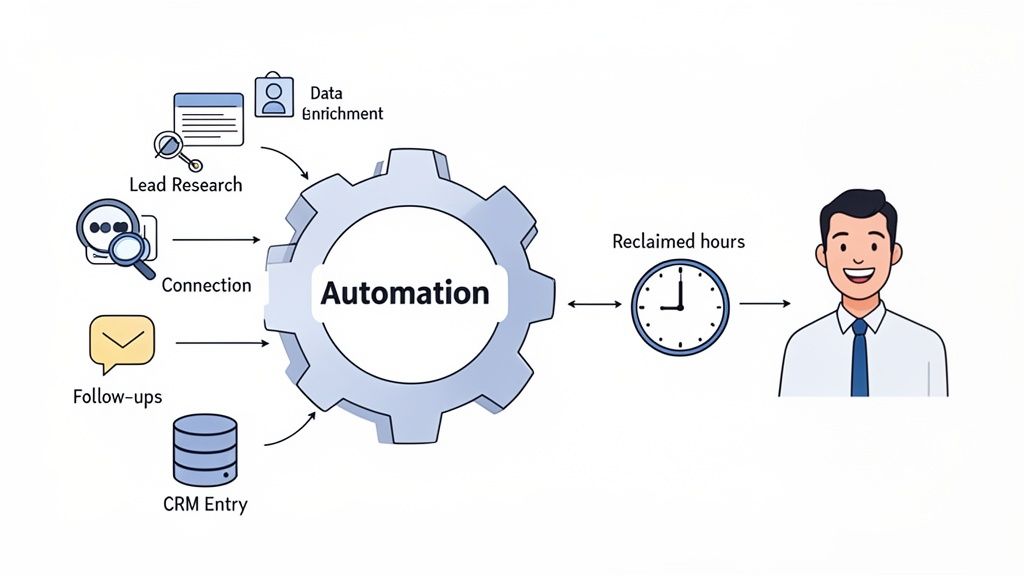
Lead Research & Enrichment (2-3 Hours/Week Saved)
Manually digging through profiles to find good prospects is a massive time sink. Automation tools can work 24/7, pinpointing leads based on your exact criteria—like recent job changes, company funding announcements, or specific keywords in their posts.
The best part? These tools don't just find the person; they enrich the profile with verified contact info. Instead of starting the day with hours of digital detective work 🕵️, your team gets a pre-qualified list of high-intent prospects ready for outreach.
Connection Request Outreach (3-4 Hours/Week Saved)
Sending personalized connection requests one by one is tedious and mind-numbing. A smart automation platform can send hundreds of tailored requests on your behalf, using dynamic placeholders that go way beyond a simple {first_name}.
Imagine your tool referencing a prospect’s recent post or mentioning a shared connection to create a genuinely relevant opening line. This scales personalization in a way no human can match, reclaiming 3-4 hours a week and often boosting acceptance rates.
This isn't about spamming; it's about executing a high-quality outreach strategy consistently, without the burnout.
Message Sending & Follow-Ups (2-3 Hours/Week Saved)
How many potential deals die on the vine from a missed follow-up? It happens to everyone. Automation ensures every new connection receives a thoughtful, timed sequence of messages, nurturing the relationship over days or weeks.
You can build campaigns that look something like this:
- -Day 1: A warm welcome message right after they accept your connection.
- -Day 3: A note sharing a valuable resource, like a relevant case study or blog post.
- -Day 7: A final, gentle nudge to spark a conversation.
This systematic approach guarantees persistence without forcing your team to live in their calendars. You get more conversations and fewer leads falling through the cracks. If you're exploring options, our guide on the top free LinkedIn lead generation tools is a great place to start.
CRM Data Entry & Updates (1-2 Hours/Week Saved)
Here it is: the task every salesperson loathes. Updating the CRM.
Good automation tools integrate directly with your CRM, automatically syncing lead data, conversations, and contact details. This simple fix eliminates manual copy-pasting, reduces human error, and keeps your data clean. That’s an easy 1-2 hours handed back to your team for more valuable work.
Lead Qualification & Scoring (1-2 Hours/Week Saved)
Not all leads are created equal. Automation can help you prioritize by scoring leads based on their profile data and engagement. Did someone visit your pricing page or download a whitepaper? The system flags them as a hot lead, so your reps can jump on the opportunity immediately instead of wasting time with cold prospects. To dig deeper into how no-code tools are making this happen, you can read the full analysis on LinkedIn marketing automation.
Productivity Gains by Sales Activity
Let's look at how this all comes together. The LinkedIn automation time savings aren't just isolated wins; they compound across the entire sales funnel, making each stage more efficient.
- -Prospecting & Lead Generation: Automation builds targeted lead lists 24/7, so your reps start every day with a fresh, qualified pipeline instead of a blank search bar.
- -Lead Qualification & Scoring: Systems can automatically score leads based on title, company size, and engagement, allowing reps to focus their energy on the most promising prospects first.
- -Follow-Up Sequences: No lead ever falls through the cracks. Automated, multi-step message sequences ensure consistent, professional follow-up without any manual effort.
- -CRM Management: Auto-syncing contacts and conversation histories eliminates dreaded data entry, reduces errors, and keeps your single source of truth accurate.
- -Reporting & Analytics: Get instant insights into which campaigns are working and which aren't. No more building manual reports in spreadsheets—just clear dashboards that show what's driving results.
Measuring Productivity Gains
If you can't measure it, you can't manage it. Simply feeling more productive after bringing in a LinkedIn automation tool isn’t going to cut it. To get buy-in and prove value, you need to show a clear, undeniable return on investment (ROI).
Don’t worry, this isn’t about getting buried in complex spreadsheets. Let's walk through a simple, step-by-step process.
Step 1: Establish Baseline Metrics (Before Automation)
Before you launch anything, you need to know your starting point. For one week, have your reps track their time and results manually. This is your "before" photo.
Key metrics to track:
- -Time spent on LinkedIn research, outreach, and follow-up.
- -Number of connection requests sent.
- -Connection acceptance rate.
- -Number of new conversations started.
- -Number of meetings booked from LinkedIn.
Step 2: Track Time Saved Per Activity
Once your automation is live, the most immediate win is reclaimed time. Ask your reps how much time they now spend on the same activities. The difference is your direct time savings.
Example: A rep used to spend 5 hours a week sending connection requests. With automation, they spend 30 minutes setting up campaigns. That’s a clean 4.5 hours saved per rep, per week.
Step 3: Calculate Team-Wide Savings & ROI
This is where it gets powerful. Put a dollar value on that saved time.
Here’s a simple ROI calculation formula:
Monthly Time Value = (Hours Saved Per Rep/Month) x (Number of Reps) x (Average Rep Hourly Cost)
Let's run the numbers for a team of 5 reps, each saving 12 hours a week (48 hours/month), with an average hourly cost of $50:
48 hours x 5 reps x $50/hour = $12,000 per month
If your automation tool costs $1,000/month, you’re looking at a 12x return on productivity alone. That’s a number that gets a CFO’s attention.
Step 4: Create an Ongoing Measurement Framework
This isn't a one-and-done analysis. Set up a simple monthly check-in to track your key metrics. Are your acceptance rates climbing? Are you booking more meetings? This continuous feedback loop helps you optimize your strategy and consistently demonstrate the tool's value.
Real Productivity Impact: Case Studies
Theory is great, but what does this look like in the real world? Based on industry reports and user feedback, here are a few examples of the LinkedIn automation productivity gains teams are seeing.
Case Study 1: SaaS Company
- -Team Size: 10 Sales Development Reps (SDRs)
- -Challenge: The team was spending over 60% of their time on manual prospecting and lead qualification, leading to high burnout and low meeting volume.
- -Results: After implementing a LinkedIn automation platform, the team automated lead list building and initial outreach sequences. They reclaimed an average of 12 hours per SDR per week, leading to a 40% increase in meetings booked within the first quarter.
Case Study 2: B2B Services Agency
- -Team Size: 3 Account Executives (AEs)
- -Challenge: AEs were responsible for the full sales cycle, but tedious LinkedIn prospecting was taking them away from high-value closing activities.
- -Results: By automating top-of-funnel engagement and follow-ups, each AE saved 8-10 hours per week. This allowed them to focus on demos and proposals, resulting in a 25% shorter sales cycle and a 30% lift in closed-won revenue.
Case Study 3: Enterprise Sales Team
- -Team Size: 25+ Enterprise Reps
- -Challenge: The team needed to engage multiple stakeholders within large, complex accounts, a process that was slow and difficult to scale manually.
- -Results: They used automation to run hyper-targeted, multi-touchpoint campaigns across entire buying committees. The sales automation benefits included a 50% increase in qualified enterprise leads and an estimated $2 million in new pipeline attributed to the automated campaigns in the first six months.
Productivity Gains Beyond Time Savings
Sure, getting back 10 to 15 hours a week is a massive win. But if you only see automation as a time-saver, you're missing the bigger picture. The true impact ripples through your entire sales process, making everything stronger.
- -Quality Improvements: With more time, reps can focus on higher-quality conversations. Better targeting and AI-powered personalization lead to more relevant outreach and higher response rates.
- -Consistency Gains: Every lead gets the same professional, persistent follow-up. No more opportunities falling through the cracks because someone got busy. This standardized process creates a predictable pipeline.
- -Scalability Benefits: You can engage hundreds of prospects with the same effort it used to take for dozens. This allows your team to handle a larger pipeline without adding headcount.
- -Team Morale & Retention: Let's be real: no one enjoys manual data entry. Automating the grunt work reduces burnout and lets salespeople focus on what they love—building relationships and closing deals. This leads to happier, more productive, and longer-tenured employees.
Maximizing Productivity Gains
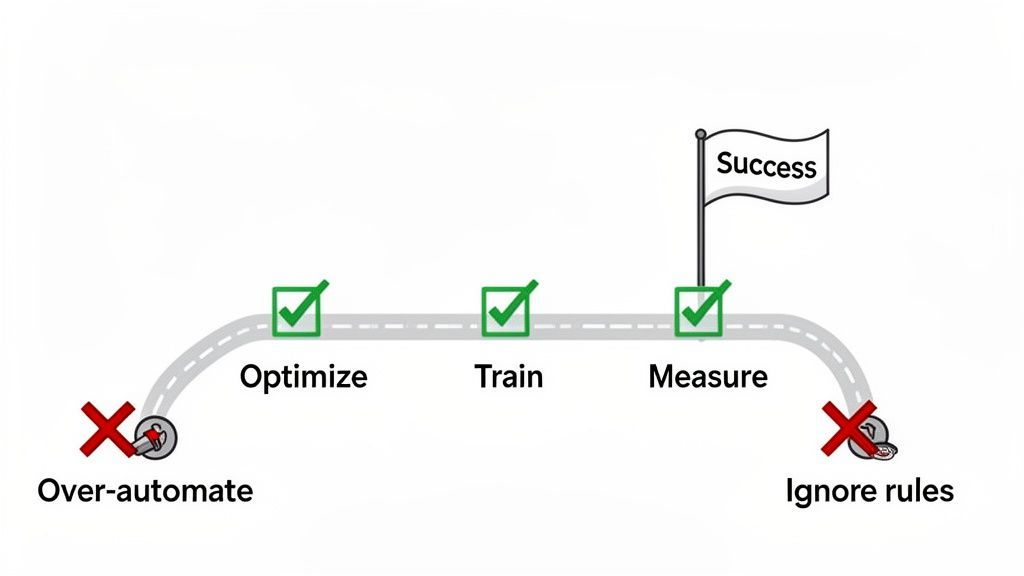
Alright, you've seen the potential. But simply flicking a switch on an automation tool isn't a magic wand. To truly maximize your LinkedIn automation productivity gains, you need a smart strategy.
Best Practices for Implementation
- -Optimize Workflows: Before you automate, map out your ideal process. Know exactly when the automation should stop and a human needs to step in. A clear workflow is the bedrock of success.
- -Team Training & Adoption: A tool is only as good as the team using it. Run hands-on workshops and focus on the "why"—how this makes their jobs easier and more profitable.
- -Continuous Improvement: Regularly review your campaign analytics. What's working? What isn't? A/B test your messaging and targeting to constantly improve results.
Avoiding Common Pitfalls
Even the sharpest teams can stumble. Based on user feedback, here are the top mistakes to steer clear of.
Do's & Don'ts of LinkedIn Automation
| Do This 👍 | Don't Do This 👎 |
|---|---|
| Personalize with AI Snippets: Use AI to reference a prospect’s recent post or a mutual connection. This makes your outreach feel specific and thoughtful. | Over-rely on {first_name}: Sending a generic template with just a name plugged in is a one-way ticket to being ignored or, worse, marked as spam. |
| Respect LinkedIn’s Limits: Stay within reasonable daily limits for connection requests and messages. This is crucial for keeping your account in good standing. | Ignore Platform Guidelines: Using aggressive, spam-heavy bots is the fastest way to get your account restricted. Always choose a tool that prioritizes safety. |
| Monitor Your Campaigns: Constantly check your acceptance rates, reply rates, and other key metrics. If a campaign is underperforming, pause it and figure out why. | "Set It and Forget It": Automation is a powerful assistant, not a replacement for strategy. Letting it run on autopilot without ever checking the results is a recipe for failure. |
Ready to build a powerful outreach plan? Check out our guide on creating a winning LinkedIn lead generation strategy that your team can execute flawlessly.
Productivity Gains by Team Size
The benefits of automation aren't one-size-fits-all. The LinkedIn automation efficiency gains look different depending on the size of your team.
- -Solo Sales Professionals: For the lone wolf, automation is like hiring a personal assistant. It handles lead sourcing and follow-ups, freeing you up to focus on demos and closing. The key gain here is leverage—one person can suddenly achieve the output of three.
- -Small Teams (2-5 Reps): At this stage, automation is about standardization and creating a predictable process. It ensures every rep follows the same winning playbook, making performance easier to manage and forecast.
- -Mid-Market Teams (5-20 Reps): Here, scalability is the name of the game. Automation allows you to dramatically increase outreach volume without sacrificing personalization, helping you hit aggressive growth targets without doubling your headcount.
- -Enterprise Teams (20+ Reps): For large teams, automation is about data, compliance, and strategic account penetration. It provides the analytics needed to optimize performance at scale and run complex, multi-touch campaigns across entire buying committees.
Your Path to a More Productive Sales Team
Let's cut to the chase. Sticking with manual LinkedIn prospecting is no longer a viable strategy. It's a direct drain on your most valuable resource: your sales team's time.
By embracing smart automation, you’re not just speeding up old tasks—you’re fundamentally changing the way your team sells. You're trading hours of tedious, low-value work for strategic, high-impact conversations. The ROI justification is clear: reclaiming 10-15 hours per rep each week translates directly into more pipeline, shorter sales cycles, and a healthier bottom line.
The next step is to see it in action. Stop letting your team get bogged down in busywork and start empowering them to do what they do best: sell.
Ready to stop wasting time on manual prospecting and start generating high-intent leads on autopilot? GojiberryAI is your AI copilot for B2B sales, identifying warm leads and engaging them with smart, personalized outreach.
Discover how GojiberryAI can save your team 10+ hours a week
FAQs on LinkedIn Automation Productivity
Is using LinkedIn automation safe for my account?
This is the big one, and for good reason. The key to safety is choosing smart tools that mimic human behavior rather than aggressive bots that blast out spam. A safe platform will:
- -Work within LinkedIn's daily activity limits.
- -Use randomized delays between actions.
- -Focus on hyper-personalization to avoid sounding robotic.
The danger lies with cheap, low-quality bots. A reputable tool prioritizes account safety above all else, making the process secure and sustainable.
Doesn't automation kill personalization?
Not anymore. It's actually the opposite with modern, AI-powered tools. While old-school automation was limited to {first_name}, today's platforms can generate hyper-relevant "icebreakers" based on a prospect's recent posts, job changes, or shared experiences.
The goal isn't to be less human; it's to be more human, more often. Automation handles the research and initial outreach, freeing up reps to have deeper, more meaningful conversations once a prospect responds.
How quickly can we expect to see productivity gains?
The initial relief is almost immediate. In the first week, your team will feel the weight of manual prospecting lift. Based on user feedback and industry reports, tangible results like saving 10+ hours per rep per week typically become evident within the first 30 days. The full ROI, measured in new pipeline and closed deals, usually becomes crystal clear within the first quarter as those initial automated conversations mature into real sales opportunities.

More High-Intent Leads = Your New Growth Engine.
Start Now and Get New High Intent Leads Delivered Straight to Slack or Your Inbox.